Introduction:
In my previous article, i had described how you would normally go about decompiling an iOS application. That method would be working for a majority of applications. However, many a times the developers push in security feature to prevent the attackers from decompiling/debugging the application.
In our case, though we are the developers friends and are testing the application, it would be good if we actually follow the same route as an attacker would. That way, we can understand what exact information is disclosed and how the application can be compromised.
Requirements:


In my previous article, i had described how you would normally go about decompiling an iOS application. That method would be working for a majority of applications. However, many a times the developers push in security feature to prevent the attackers from decompiling/debugging the application.
In our case, though we are the developers friends and are testing the application, it would be good if we actually follow the same route as an attacker would. That way, we can understand what exact information is disclosed and how the application can be compromised.
Requirements:
- iOS device must be jailbroken.
- OpenSSH should be installed on the iOS device.
- SSH Client on your machine.
- "Class Dump" should be installed on the iOS device via "Cydia"
- "Cycript" should be installed on the iOS device via "Cydia".
First we will try and use the same step as used in our previous post to dump the class file information via "class dump".
Below screenshot shows
one of such an instances when we use classdump to decompile an
application. The command run is of the same syntax as used earlier
but the content is unreadable.
In
such a case, using class dump alone would not be fruitful. We have to
use a tool called as "Cycript" along with “weak_classdump”
by Elias Limneos which is Cycript script that generates a header file
for the class passed to the function.
It can be used as
follows.
Step 1: Get the process
id of the running application to be decryped and decompiled using the
command "ps -ax | grep "App"".
The
above screenshot shows that the process id was "3785".
Step 2: Download the
latest copy of "weak_classdump.cy" from "weak_classdump" on to the working folder.
Then, use the below
command to inject weak_classdump into the application to be decrypted
and decompiled:
cycript -p
3785 weak_classdump.cy; cycript -p 3785
If, the injection was
successfull, you will get the message as 'Added weak_classdump to
"TWCTV" (3785)' where "TWCTV" is the application to
be decrypted and decompiled.
Step 3: Now, you will
get cy# where you will have to enter the below command to do the
actual decompilation and to dump the required info.
weak_classdump_bundle([NSBundle
mainBundle],"/tmp/3847_decrypted_application")
This step takes a lot
of time and you would get somthing like the screenbelow when the
process is complete.
Step
4: Now, exit cycript and you can access the complete decompiled
cleartext source at "/tmp/3847_decrypted_application".
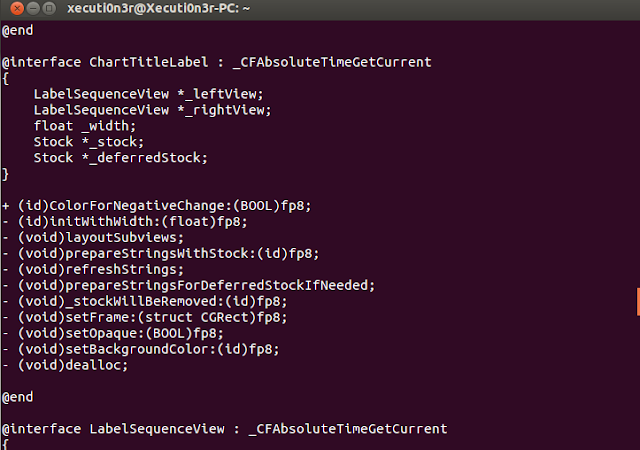
The above screenshot
shows that the source code is in cleartext and can be easily
analysed and the function names and values can be hooked in the runtime using Mobile Substrate or Cycript to force the application to perform various malicious activities.
References: